

 Product
 Brand
Brand Articles
 Tools
Tools
Introduction to DDIC (Display Driver IC)

What is DISPLAY DRIVER?
Quick answer
A display driver IC (DDIC) is the interface between digital image data and the electrical drive signals required by a display panel. Depending on the panel architecture, the driver system can include source drivers, gate drivers, timing-control functions, power and bias circuits, gamma functions, frame memory, or touch integration. Those blocks may be combined in one device or distributed across several ICs.
The most useful way to understand a DDIC is not as the "brain" of a screen, but as a precisely timed data and power-conversion system. It receives formatted image information, selects rows, applies column data levels, and helps each pixel produce the intended brightness and color.
What is a display driver IC?
A display driver IC converts digital image data and control commands into the analog voltages, currents, and timing signals required by a display panel. The exact output depends on the panel technology. A TFT-LCD source driver typically applies carefully controlled column voltages, while an OLED driver must support the electrical behavior of emissive pixels and the panel's pixel circuit.
Display-driver products are used in phones, tablets, monitors, televisions, vehicle displays, industrial panels, wearables, and many other systems. The label "DDIC" therefore describes a function, not one universal pinout or internal architecture.

Common functions associated with a display-driver system include:
Interface reception: Accepts image data and commands from an application processor, graphics processor, bridge, or timing controller.
Timing and formatting: Aligns incoming data with the row and column sequence required by the panel.
Source driving: Produces column data levels that determine pixel gray level or emission command.
Gate driving: Selects the row that is being written.
Power, gamma, and bias support: Generates or controls panel-specific electrical levels.
Optional integration: Some devices include frame memory, touch sensing, display power management, or image-processing functions.
How the DDIC signal path works
A simplified display path starts with a host or application processor. The host sends image data and control information through the display interface. Timing-control logic converts that stream into the sequence expected by the panel. Source drivers then provide column data, while gate drivers activate rows so that the intended pixel cells are updated.
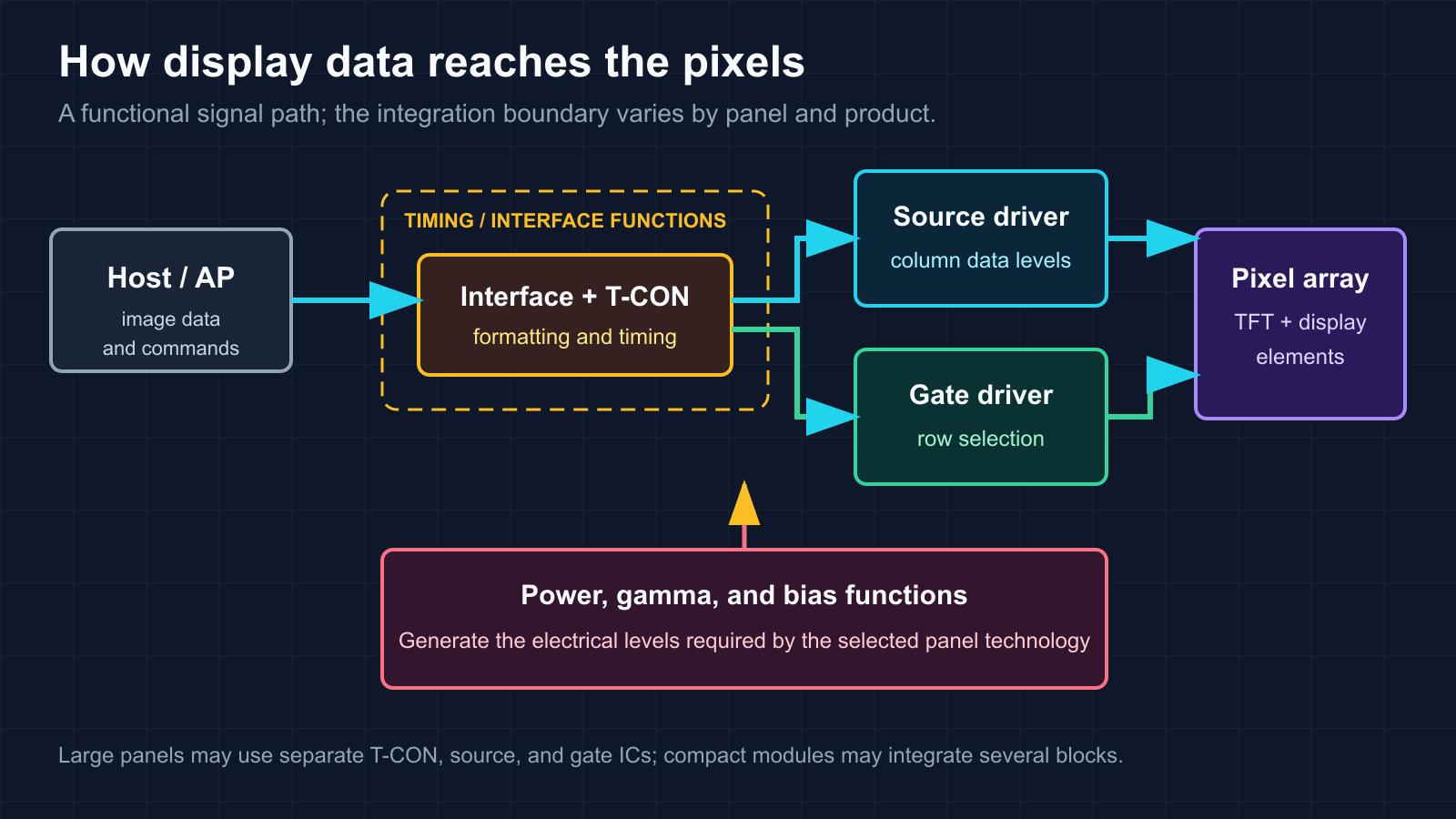
Integration is a major source of confusion. A large panel can use a separate T-CON plus multiple source and gate drivers. A smaller panel may combine timing control, source drive, gate drive, frame memory, and power functions in one IC. Both designs can be described as display-driver systems, so a block diagram must be read together with the product datasheet.
Source driver, gate driver, and T-CON
What does a source driver do?
The source driver receives pixel data and produces the column outputs used to establish each pixel's data level. For a TFT-LCD, this usually means a set of analog voltages applied to the liquid-crystal pixel cells. The relationship between digital code and optical brightness is shaped by gamma characteristics, panel behavior, and calibration.
What does a gate driver do?
The gate driver selects rows in sequence. When a row is active, the corresponding pixel switches can accept data from the source lines. Some panels use separate gate-driver ICs; others integrate gate-driver circuitry into the panel or the main driver package.
What does a T-CON do?
The timing controller, or T-CON, receives image data from the host side and converts it into the timing and data format required by the source and gate drivers. It coordinates the update sequence, but it is not accurately described as the display's CPU. The T-CON may be a separate IC or part of a more highly integrated display driver.
| Block | Main responsibility | Typical output | Integration note |
|---|---|---|---|
| T-CON | Data formatting and panel timing | Timed data and control signals | May be separate or integrated |
| Source driver | Column data conversion | Analog voltage or current-related drive | One or multiple ICs depending on panel size |
| Gate driver | Row selection | Gate-on and gate-off waveforms | May be a separate IC or panel-integrated circuit |
| Power and bias | Panel electrical rails and reference levels | Technology-specific supply, gamma, and bias levels | May be inside the DDIC or provided externally |
How do passive matrix and active matrix displays differ?
Both approaches organize pixels at row and column intersections, but they differ in how the selected pixel state is controlled.
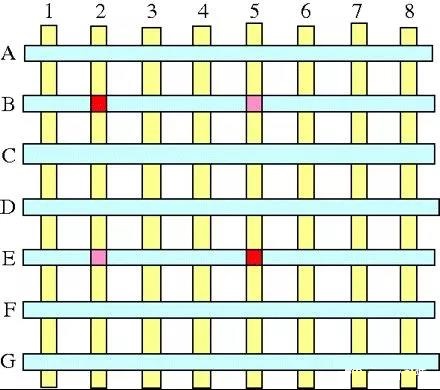
Passive matrix
In a passive-matrix panel, rows are scanned and column drive is applied without a dedicated thin-film transistor storage switch at every pixel. The multiplexed drive scheme is comparatively direct, but duty cycle, crosstalk, contrast, panel size, and resolution become important design constraints. Passive-matrix OLED is one implementation of this approach, but passive matrix is a broader addressing concept.
Active matrix
An active-matrix panel uses a thin-film transistor switch at each pixel, together with storage behavior that holds the written state between addressing events. The exact pixel circuit can contain more than one transistor and capacitor, especially in OLED panels. Active-matrix addressing is used in both TFT-LCD and active-matrix OLED displays, so "active matrix" is not another name for AMOLED alone.
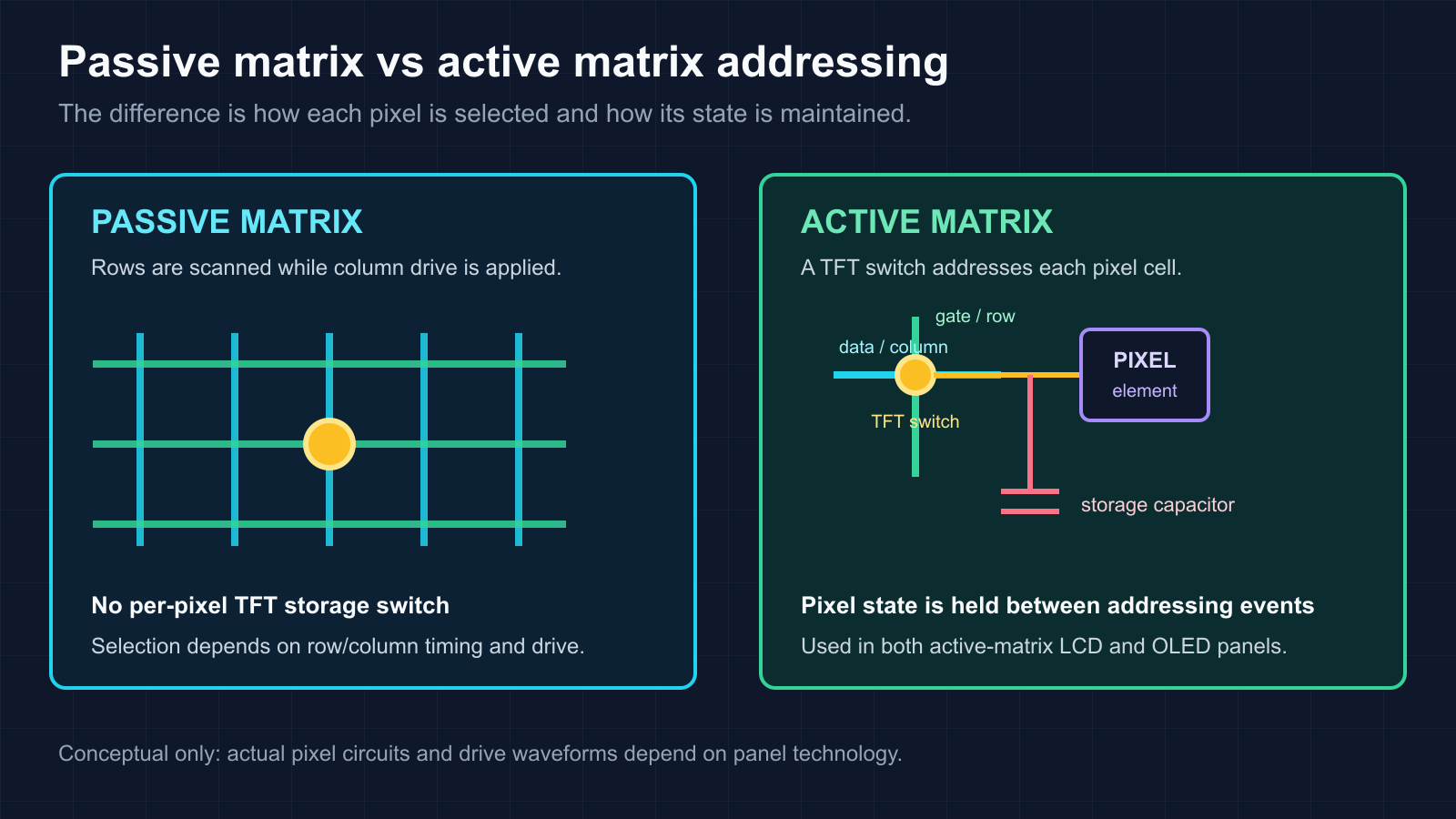
| Characteristic | Passive matrix | Active matrix |
|---|---|---|
| Pixel selection | Row-column multiplexing | Per-pixel TFT switching |
| State between addressing events | Depends on multiplexed drive and pixel behavior | Held by the pixel circuit between updates |
| Panel examples | Segmented or passive-matrix display implementations | TFT-LCD and active-matrix OLED |
| Engineering focus | Duty cycle, crosstalk, drive waveform, panel size | TFT characteristics, storage, compensation, source and gate timing |
How do LCD and OLED driver requirements differ?
An LCD does not emit light from the liquid crystal itself. The pixel voltage changes the liquid-crystal state, which controls how much light from the backlight passes through the optical stack. The driver therefore needs output levels, polarity behavior, timing, gamma references, and common-voltage conditions matched to that LCD panel.
An OLED pixel is emissive. Its driver and pixel circuit control the electrical conditions that produce light. OLED DDICs can include functions for panel power, current-related drive, gamma control, and panel-specific compensation. The exact compensation method is product-specific; it should not be assumed from the generic term "OLED DDIC."
Refresh rate, resolution, color depth, interface bandwidth, and power targets all affect DDIC selection, but no single refresh-rate or resolution figure defines a modern DDIC. Those limits must be checked in the datasheet for the exact device and panel configuration.
What are COG, COF, and COP?
COG, COF, and COP describe where the driver IC is mounted and how it connects to the display substrate. They are not simply three generations in which one universally replaces the previous one.
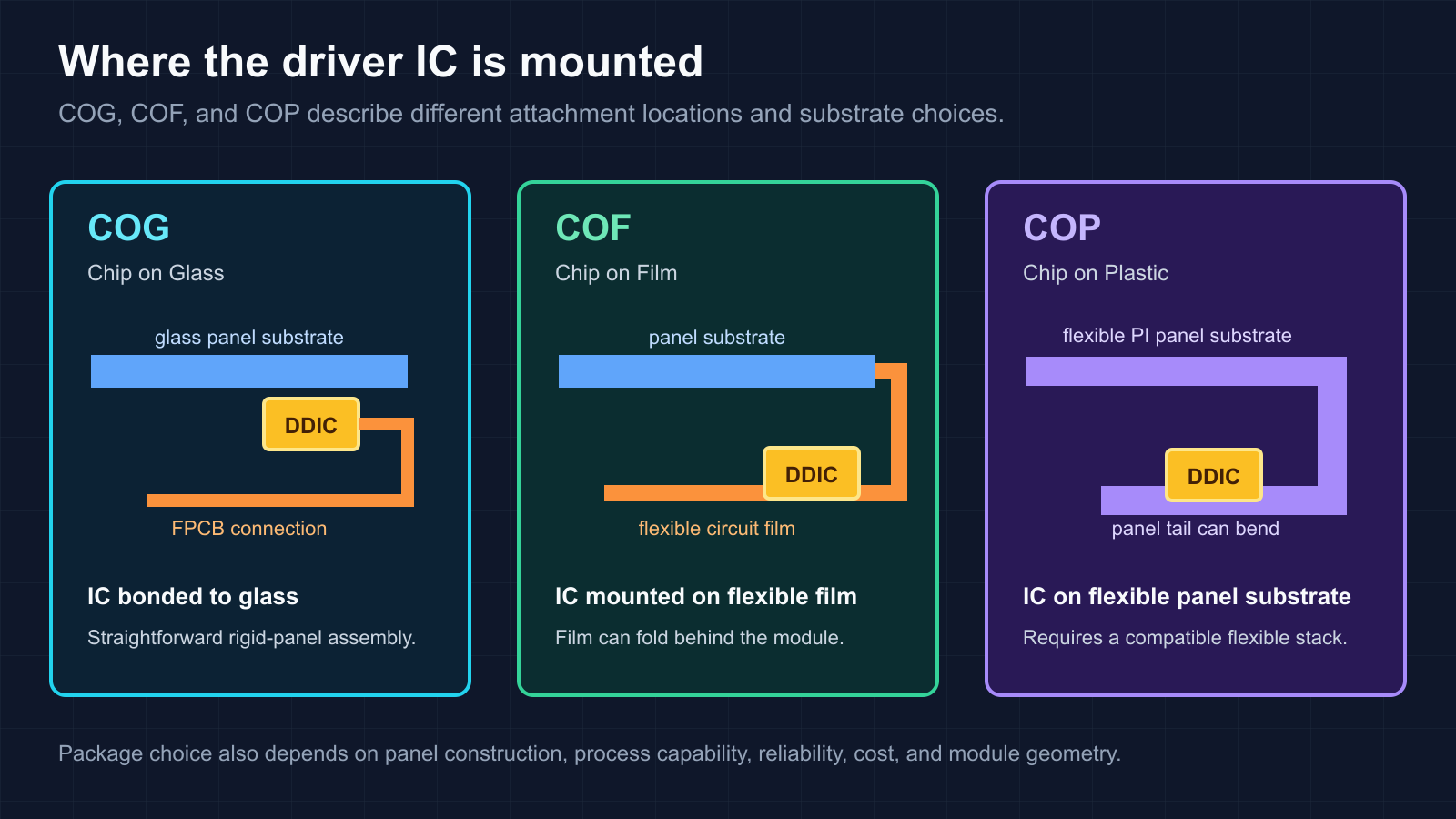
COG: Chip on Glass
In COG assembly, the driver IC is bonded directly to the display's glass substrate. The glass must provide room for the chip and interconnect area. COG remains useful where the panel construction, cost target, module geometry, and manufacturing process favor direct attachment to rigid glass.
COF: Chip on Film
In COF assembly, the driver IC is mounted on a thin flexible circuit film that connects the panel to the flexible printed circuit board. The film can be routed or folded behind the module, giving the mechanical designer more freedom around the panel edge. Reliability still depends on the film, bonding process, bend geometry, and operating environment.
COP: Chip on Plastic
In COP assembly, the driver IC is attached directly to the flexible polyimide substrate used by a compatible display panel. The extended substrate can be bent behind the active area, which can help reduce the front-facing module border. COP requires a flexible panel stack and a manufacturing process designed for that substrate; a rigid glass panel cannot use the same structure without redesign.
| Method | DDIC mounting location | Mechanical characteristic | Key review items |
|---|---|---|---|
| COG | Directly on glass substrate | Rigid attachment area | Glass margin, bonding, FPCB connection, module border |
| COF | On flexible circuit film | Film can be folded or routed | Film stack, bend radius, bonding, thermal and mechanical stress |
| COP | On flexible polyimide panel substrate | Panel tail can bend behind the display | Flexible-panel compatibility, substrate process, bend reliability, module geometry |
DDIC selection checklist
A display driver must be selected together with the panel and module architecture. Start with the electrical interface, then verify the analog outputs and mechanical implementation.
Panel technology: Confirm LCD, OLED, or another display type, plus the exact backplane and pixel-circuit requirements.
Resolution and channel count: Match source outputs, gate outputs, multiplexing, and the number of driver ICs to the panel.
Interface and bandwidth: Check the host interface, lane count, clocking, supported data format, refresh-rate range, and color depth.
Output characteristics: Verify source voltage or current behavior, gate waveforms, gamma references, common voltage, and output accuracy.
Power architecture: Review required supply rails, sequencing, bias generation, efficiency, standby behavior, and fault handling.
Integration boundary: Determine whether T-CON, frame memory, power, gate drive, or touch functions are internal or external.
Package and substrate: Confirm COG, COF, COP, or another package against the panel construction and assembly process.
Mechanical and reliability limits: Check bend radius, bonding, thermal path, vibration, humidity, lifetime, and qualification requirements.
Software and initialization: Validate command sets, timing parameters, calibration data, and the host driver's startup sequence.
Supply continuity: Confirm lifecycle status, documentation access, manufacturing support, and change-control requirements.
Frequently asked questions
Is a DDIC the same as a T-CON?
No. A T-CON formats data and controls panel timing, while source and gate drivers create the electrical signals that address pixels. Some products integrate these functions, which is why the terms can appear together in a single device description.
Is active matrix the same as AMOLED?
No. Active matrix is an addressing architecture based on per-pixel switching and storage. AMOLED is an active-matrix OLED implementation. TFT-LCD panels also use active-matrix addressing.
Does every display use separate source and gate driver ICs?
No. Large panels often distribute the work across multiple ICs, while compact panels may integrate source, gate, timing, memory, and power functions. Some gate-driver functions can also be formed directly on the panel.
Which is better: COG, COF, or COP?
There is no universal winner. COG suits direct attachment to rigid glass, COF provides flexible routing through a film, and COP is designed around a flexible panel substrate. The correct choice depends on panel construction, border target, cost, process capability, reliability, and module geometry.
Can two DDICs with similar specifications be exchanged directly?
Do not assume so. Interface commands, output levels, channel mapping, timing, package geometry, panel calibration, power sequencing, and software initialization can all differ. A substitution requires panel-level electrical, mechanical, firmware, and image-quality validation.
Official sources
 UTMEL
UTMEL
We are the professional distributor of electronic components, providing a large variety of products to save you a lot of time, effort, and cost with our efficient self-customized service. careful order preparation fast delivery service
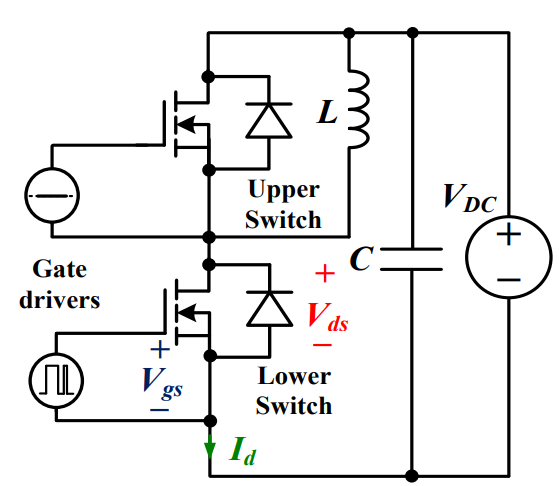 Discovering New and Advanced Methodology for Determining the Dynamic Characterization of Wide Bandgap DevicesSaumitra Jagdale15 March 20242900
For a long era, silicon has stood out as the primary material for fabricating electronic devices due to its affordability, moderate efficiency, and performance capabilities. Despite its widespread use, silicon faces several limitations that render it unsuitable for applications involving high power and elevated temperatures. As technological advancements continue and the industry demands enhanced efficiency from devices, these limitations become increasingly vivid. In the quest for electronic devices that are more potent, efficient, and compact, wide bandgap materials are emerging as a dominant player. Their superiority over silicon in crucial aspects such as efficiency, higher junction temperatures, power density, thinner drift regions, and faster switching speeds positions them as the preferred materials for the future of power electronics.
Read More Applications of FPGAs in Artificial Intelligence: A Comprehensive GuideUTMEL29 August 20255655
This comprehensive guide explores FPGAs as powerful AI accelerators that offer distinct advantages over traditional GPUs and CPUs. FPGAs provide reconfigurable hardware that can be customized for specific AI workloads, delivering superior energy efficiency, ultra-low latency, and deterministic performance—particularly valuable for edge AI applications. While GPUs excel at parallel processing for training, FPGAs shine in inference tasks through their adaptability and power optimization. The document covers practical implementation challenges, including development complexity and resource constraints, while highlighting solutions like High-Level Synthesis tools and vendor-specific AI development suites from Intel and AMD/Xilinx. Real-world applications span telecommunications, healthcare, autonomous vehicles, and financial services, demonstrating FPGAs' versatility in mission-critical systems requiring real-time processing and minimal power consumption.
Read More The 2026 Engineer’s Guide: Choosing the Right MCU for Your Next IoT & New Energy ProjectUTMEL30 April 20261968
A comprehensive comparison of 2026's leading MCUs from ST, NXP, and Microchip across power efficiency, processing performance, connectivity, and ecosystems to help engineers select the optimal chip for next-gen IoT and new energy projects.
Read More AI Server Components: Engineering Next-Gen Data Center Hardware for 100kW RacksUTMEL15 May 20261049
The transition from traditional enterprise IT to AI-driven workloads has rendered legacy data center hardware obsolete, forcing infrastructure planners to re-engineer server components for extreme thermal environments.
Read More The Practical Engineer’s Guide to the NE555N Timer: Pinout, Setup, and TroubleshootingUTMEL29 May 2026864
This comprehensive guide explores the NE555N timer, detailing its 8-pin layout, internal architecture, and key datasheet specifications. It compares the bipolar IC to CMOS variants and details setup configurations for astable, monostable, and bistable modes. Additionally, the guide offers practical troubleshooting advice to prevent common breadboard failures, such as floating reset pins and electrical noise issues.
Read More
Subscribe to Utmel !
![MOC3073SR2M]() MOC3073SR2M
MOC3073SR2MON Semiconductor
![FM31278-GTR]() FM31278-GTR
FM31278-GTRCypress Semiconductor Corp
![HCS410/P]() HCS410/P
HCS410/PMicrochip Technology
![L9654TR]() L9654TR
L9654TRSTMicroelectronics
![AT88SC6416C-MJTG]() AT88SC6416C-MJTG
AT88SC6416C-MJTGMicrochip Technology
![MOC3062SVM]() MOC3062SVM
MOC3062SVMON Semiconductor
![HCS512T-I/SO]() HCS512T-I/SO
HCS512T-I/SOMicrochip Technology
![LZ9FC23]() LZ9FC23
LZ9FC23Sharp Microelectronics
![HCS370/ST]() HCS370/ST
HCS370/STMicrochip Technology
![MCS3142-I/ST]() MCS3142-I/ST
MCS3142-I/STMicrochip Technology


